


GPS, Maps Driving Directions
3.91.55K Reviews
App Specs
- Version
- 1.0.80
- Updated On
- License
- Free
- Downloads
- 5,000,000+
- Developer
- MAPIDIRECTIONS STUDIOS
- Categories
- Maps & Navigation
- Platform
- Android
Screenshots
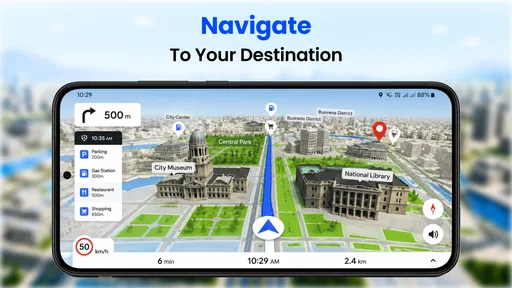
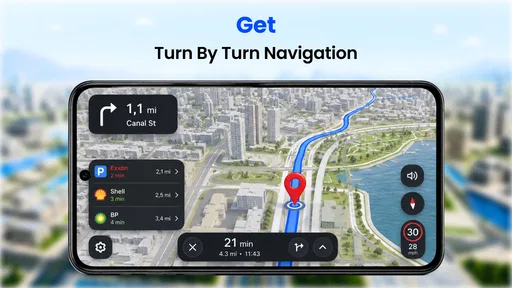
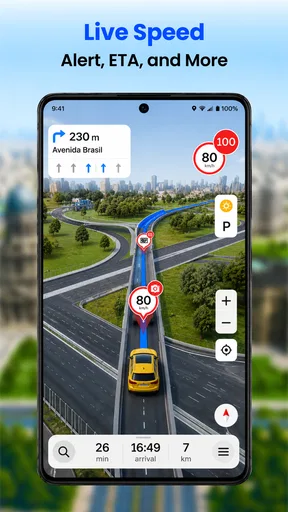
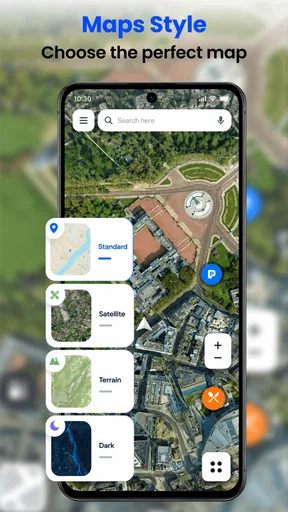
 Analysis by AppCompare
I judge a navigation app less by how many features it can name than by what happens between deciding where to go and actually arriving. Can I enter a destination without fuss, follow directions without staring at my phone, and recover sensibly if I miss a turn? Those everyday handoffs are where GPS, Maps Driving Directions has to earn its place. It is a free maps and navigation app from MAPIDIRECTIONS STUDIOS, with a 4.0 average from around 14,000 ratings and over 5 million installs. That reach makes it worth considering, but the practical question is whether its tools fit the way you travel.
Choosing it for the right kind of trip
I see the strongest case for this app in familiar, practical journeys: commuting, finding a nearby service, or getting across an unfamiliar part of town without planning every turn in advance. Its stated mix of map search, voice guidance, traffic information and points of interest is aimed at people who want one place to work through those steps. A driver who mainly needs spoken directions can benefit from keeping the screen glance brief, while someone exploring a new area may appreciate being able to search for a stop along the way.
It is less compelling if your first requirement is a navigation tool whose behavior you already know by heart, or if you need a carefully verified route for a high-stakes journey. I would keep a familiar alternative available until I had tried this one on ordinary routes. A map can look reassuring while still requiring the driver to check signs, lane markings and local restrictions; the app should assist your decisions, not replace attention to the road.
From destination search to the first turn
The practical workflow starts with a destination. Once you have opened the app, its search-led interface gives you a direct way to enter where you want to go rather than making you work through a complicated planning process. Before setting off, I would check the destination carefully, especially when several places share a name, and make sure the selected result is the right branch or street. That small pause is more useful than trying to correct a mistaken address while moving.
For a typical trip, I would enter the destination while parked, review the route, and then start voice-guided navigation before pulling away. That order matters: it gives you time to notice whether the destination makes sense and to set the phone somewhere visible without handling it in traffic. Voice prompts are useful as a reminder of the next move, but I would still glance at the map when safely stopped if a junction or entrance is unclear.
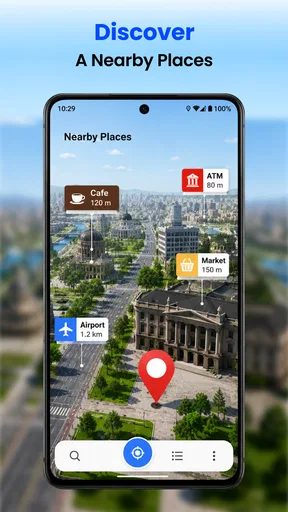
When the route includes an errand, the search for a point of interest can change the workflow. Instead of ending navigation, searching separately, and starting over, you can use the map’s place-finding tools to consider a stop such as a restaurant or gas station. I would decide whether the stop is genuinely on the way before committing; a nearby result on a map is not necessarily convenient from the road you are taking. This is a small but important distinction when you are short on time.
Traffic, rerouting and the handoffs between them
Traffic updates can be most useful before you leave, when a possible delay might affect your departure time, and during a trip when conditions change. They are not a reason to keep watching the display. I would let the spoken prompts carry routine guidance and check the map only when parked or when a passenger can do it. That makes the app’s navigation tools more helpful without turning a drive into a sequence of screen checks.
Worth Reading Before You Choose

EA SPORTS FC Mobile 26 Is a Bigger Football Game, but It Takes Time

Flipboard Shows What News Apps Must Do Beyond the Feed

Switching to Android Auto Means Rethinking Your Driving Routine

Google Calendar Makes a Crowded Week Easier to Manage

Ludo King Makes the Most of the Minutes Between Plans

Baby Panda World Brings Quick Play to Modern Phones, but Its Game Library Feels Busy
Rerouting is the point where convenience can become friction. The published review experience notes that the app can sometimes respond a little too eagerly after a missed turn. If that happens, I would avoid making a sudden maneuver to satisfy the new instruction. Continue safely, listen for the revised route, and follow it only when it is legal and practical. A navigation app can recalculate; it cannot judge whether a lane change is safe in the moment.
There is also a handoff between the app and the real road that deserves attention. Voice guidance can tell you what to do next, while road signs and lane markings show what is actually permitted. If those disagree, I would follow the road rules and use a safe place to pause before reconsidering the route. This is especially important around complicated intersections, unfamiliar access roads and destinations with several possible entrances.
Offline planning and arriving with fewer surprises
The offline maps option is valuable when you expect weak internet, but it works best as preparation rather than an emergency fix. I would download the area I expect to travel through before leaving a reliable connection, then check that the intended destination falls within the saved coverage. This is particularly sensible for a road trip through patchy-signal areas. An offline map can help preserve access to map information, but I would not assume that every connected feature, such as live traffic, will behave the same without internet.
At the destination, navigation is not quite finished when the route line ends. A large venue, a town-center address or a place with multiple entrances may still require a short final check. I would use the map to orient myself, then rely on visible signs and safe stopping options to complete the last stretch. For a driver meeting someone, sharing the expected arrival time by another method can also prevent the common confusion of waiting at the wrong entrance.
For someone who regularly drives the same commute, a useful habit is to compare the suggested route with the one they normally take before setting off. Traffic information may make an alternate route attractive, but a shorter-looking path is not automatically easier: it may involve turns or unfamiliar streets that cost attention. On a routine trip, I would take a recommendation when it clearly helps, not simply because the app has proposed a different line.
Getting Started with GPS, Maps Driving Directions
First things first, downloading the GPS, Maps Driving Directions app is a breeze. Available on both Android and iOS, just head over to your app store, hit download, and you’re good to go. Once installed, the app welcomes you with a clean, intuitive interface. No clutter, just a simple search bar waiting for you to type in your destination.
Features That Stand Out
The app isn’t just your run-of-the-mill map tool. It’s packed with features that make it a must-have for any traveler or daily commuter. One feature that caught my eye is the real-time traffic updates. Ever been stuck in traffic, watching the clock tick away? This app’s got your back with live updates to help you dodge those dreaded jams.
Another nifty feature is the voice-guided navigation. You won’t need to keep your eyes glued to the screen, which is not only convenient but also safer. Just listen to the friendly voice guiding you through your journey.
Exploring the World with Ease
Whether you’re road tripping across the country or just trying to find a nearby gas station, the app’s extensive database covers it all. You can search for various points of interest, from restaurants to tourist attractions, with detailed information and reviews. It’s like having a tour guide in your pocket.
Plus, the offline maps feature is a lifesaver when you’re in an area with spotty internet. Download your maps ahead of time, and you’ll never be without directions, even when your data plan decides to take a break.
Using it alongside other navigation choices
Compared with the familiar map apps many people already use, this one’s appeal is its straightforward combination of route guidance and nearby-place searches. That can suit someone who wants to try a different navigation option without learning a complicated planning system. On the other hand, if your usual app is already dependable for your commute, traffic checks and saved places, switching has little value unless this app handles a particular journey better for you.
I would treat it as a practical alternative to test, not an automatic replacement for every navigation tool on your phone. For a first trial, choose a route you know well. You can see whether the directions make sense, how comfortable the voice prompts are, and whether the map presentation works for you without risking a stressful first experience somewhere unfamiliar. If you are planning a complex trip, compare the proposed route with another trusted source before leaving.
Why I’m Hooked
What really keeps me coming back to GPS, Maps Driving Directions is its reliability. I’ve tested it in urban jungles and country roads, and it’s consistently delivered precise directions. There’s something reassuring about having a tool that just works, no fuss, no drama.
And let’s not forget the little extras that enhance the experience. The weather updates ensure you’re prepared for any storm that might come your way, and the speed limit alerts keep you in check, helping avoid any surprise tickets.
Cost, suitability and the trade-offs
The app is free to install and is rated for Everyone, so it is accessible to a broad audience. It has been available since April 11, 2018, and its current version is 1.0.75. Optional in-app purchases range from $1.99 to $15.99 per item. I would start with the free experience and decide whether any paid extras matter to my routine rather than paying simply because an upgrade is offered. A person who only needs occasional directions may have no reason to spend more.
Its average rating is 4.0, drawn from around 14,000 ratings and roughly 1,500 written reviews. Those figures offer a broad sense of how people respond, not a guarantee that it will suit every phone, route or driving habit. MAPIDIRECTIONS STUDIOS is the developer, and the app’s large install base suggests it is familiar to many users, but I would still judge it by a real test drive on a route I know.
For a daily driver, the most useful way to assess it is to try several different conditions: a simple local trip, a destination you have not visited, and a route where mobile coverage may be unreliable. That gives a better picture than testing only one easy journey. If voice prompts are distracting, if the route choices do not match your needs, or if you depend on a specific feature in another navigation app, there is no benefit in forcing a switch.
A Few Things to Keep in Mind
While the app is amazing, it's not without a couple of quirks. Occasionally, the rerouting can be a bit overzealous, especially if you miss a turn. But hey, no app is perfect, right? Just keep your cool, and it’ll have you back on track in no time.
Also, while the free version is quite robust, there are some premium features locked behind a paywall. If you’re someone who loves all the bells and whistles, you might want to consider upgrading.
Who should choose it, and who should pass
I would recommend giving it a try if you want a free navigation app for everyday driving, want voice guidance, or like having nearby places and route information in one workflow. It can also be a useful backup for travel when you have prepared an offline map in advance. For a family trip, for example, a passenger can check a possible stop while the driver keeps attention on the road; that division of tasks is safer and less stressful than making the driver search while moving.
I would be more cautious if you need navigation to handle every detail without supervision, if your trip depends on a particular route constraint, or if your current app already fits your habits perfectly. Do not rely on any map alone for road closures, temporary signs or the final approach to a tricky entrance. Keep the phone mounted and use it responsibly, and let actual road conditions overrule a prompt that arrives at the wrong moment.
The Final Word
In an age where getting lost is no longer an option, having a reliable navigation app is essential. GPS, Maps Driving Directions ticks all the right boxes with its user-friendly interface, comprehensive features, and consistent performance. Whether you’re exploring new territories or just making your daily commute smoother, this app is worth having on your phone.
So, if you’re ready to level up your navigation game, give it a whirl. Trust me, once you do, you’ll wonder how you ever managed without it.
Making the first trip a fair test
My final practical advice is to install the app before you need it, enter a familiar destination while stationary, and listen to a few prompts on a low-pressure drive. That lets you learn how its directions sound and how it responds to a missed turn before a time-sensitive journey. If you plan to use offline maps, prepare them while connected rather than waiting until reception disappears. Those simple habits make it easier to tell whether this particular app belongs in your regular navigation routine.
Pros
- Accurate real-time traffic updates.
- User-friendly interface with clear maps.
- Voice-guided navigation for hands-free use.
- Offline maps available for data saving.
- Customizable routes for personal preferences.
Cons
- High battery consumption during use.
- Occasional GPS signal loss in remote areas.
- Frequent ads in the free version.
- Limited features without a premium subscription.
- Large app size may affect storage space.
FAQs for GPS, Maps Driving Directions
What features does the GPS, Maps Driving Directions app offer?
The GPS, Maps Driving Directions app provides real-time navigation, voice-guided directions, and live traffic updates. It also includes offline maps, route planning, and points of interest. Users can customize their routes with options like fastest or shortest paths, and it supports various modes like driving, walking, and cycling.
Is the app available for both Android and iOS devices?
Yes, the GPS, Maps Driving Directions app is available for both Android and iOS platforms. Users can download it from the Google Play Store and Apple App Store. It’s designed to offer a seamless experience across different devices, ensuring you have access to navigation wherever you are.
Does the app require an internet connection to function?
The app primarily uses an internet connection for real-time features like live traffic updates and location sharing. However, it also supports offline maps, allowing you to download specific regions beforehand. This is particularly useful when traveling to areas with limited connectivity, ensuring you still have access to essential navigation features.
Are there any in-app purchases or subscriptions?
The GPS, Maps Driving Directions app is free to download, but it may offer in-app purchases or subscriptions for premium features. These might include ad-free usage, advanced navigation tools, or additional map downloads. It’s advisable to review the app’s pricing details in the app store to understand any potential costs.
How accurate is the navigation and traffic information provided by the app?
The app uses a combination of GPS technology and live data updates to provide accurate navigation and traffic information. While it strives to offer precise directions and timely traffic alerts, factors like network coverage and local conditions can affect accuracy. Users generally find it reliable, but it’s always good to stay aware of surroundings during travel.


